BleachBit is a no-cost, open source cleanup program for Windows desktops and laptops. It walks through the folders where browsers, chat apps, media players, and Windows itself park leftover data, shows you exactly what it found, and clears only the items you check.
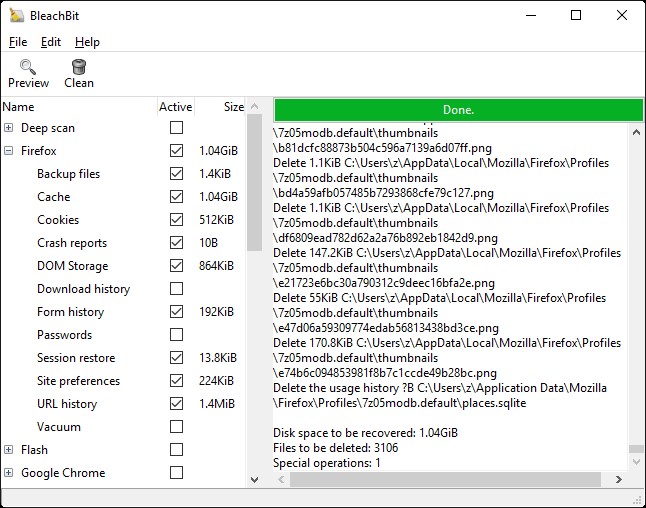
Most people reach for bleach bit software for one of two reasons: a drive that keeps filling up, or a shared computer that stores far more browsing history than they are comfortable with. The program handles both jobs in the same window, without subscriptions, upsells, or bundled extras.
What BleachBit clears on a Windows PC
- Browser caches, cookies, saved sessions, and address bar history in Chrome, Edge, Firefox, Opera, and Brave,
- Temporary files left behind by installers, updates, and crashed programs,
- Windows logs, error reports, thumbnail databases, and the recent documents list,
- Leftover data from desktop apps such as media players, office suites, and messaging clients,
- Free disk space overwriting, so files you deleted earlier cannot be pulled back with recovery tools.
Every category carries a short description in the sidebar, and nothing is touched until you press Delete. That preview step is the reason the tool has stayed popular with cautious Windows users for years. A full walkthrough lives on the guides page.
Why Windows users pick it
- Free with no license key, trial timer, or paid tier,
- Open source, so the cleanup rules can be inspected by anyone,
- A portable build that runs from a USB stick without installing,
- Command line support for scheduled or repeat cleanups,
- Translations into dozens of languages, including US English by default.
Read the feature breakdown for the full picture, or jump straight to the Windows 11 and Windows 10 notes if you want version-specific advice.
A safe first run
Start small. Check the cache entries for the browser you actually use, run Preview, glance at the file list, then delete. Skip Passwords and Deep Scan on the first pass, and leave the experimental System entries alone until you know how much space each cleaner really recovers. Our step-by-step Windows 11 walkthrough covers the same routine with screenshots of each stage.
How it compares with Disk Cleanup
The cleanup tools shipped with Windows handle update leftovers and the Recycle Bin well, but they stop at the edge of your installed applications. BleachBit reaches into per-app folders that Storage Sense never opens, which is where the real space usually hides on a machine that has been running for a couple of years. The side-by-side comparison shows where each tool wins.
Common questions about safety, portability, and what should never be checked are answered on the FAQ page.